Problem
When you create an Azure SQL Managed Instance, backups are automatically enabled for all databases with a default retention period of 7 days. However, as the number of databases grows, managing backups becomes increasingly complex. It can be both time-consuming and error-prone to ensure that backups are correctly configured for each new database. In some cases, new databases might even be overlooked, leaving them without proper backup coverage.
You can use Terraform and Azure Automation Accounts to streamline and automate the backup process.
Solution
Reference to the code is here: Github Repo
Automation Account Creation with Terraform: The Terraform code creates an Azure Automation Account within a specified resource group. This account will be used to host and run PowerShell/Runbook that automate backup configurations for Azure SQL Managed Instances.
Runbook Deployment: The script deploys a PowerShell-based runbook to the automation account. This runbook contains the logic to apply backup retention policies to all SQL Managed Instance databases. The runbook is responsible for:
- Setting short-term retention policies (e.g., 30 days of backup retention).
- Setting long-term retention policies (e.g., 12 months of monthly backup retention).
The runbook is uploaded from a local PowerShell script (sqlmi.ps1) into the automation account via Terraform’s azurerm_automation_runbook resource.
Scheduled Execution: A daily schedule is set up using the azurerm_automation_schedule resource. The script is executed once a day to ensure that any new databases or changes to existing databases are properly handled. The schedule ensures the runbook runs automatically without manual intervention.
PowerShell Runbook Logic: The PowerShell script that runs in the Azure Automation Account performs the following steps:
- Logs in to Azure using the managed identity of the automation account.
- Retrieves all Azure SQL Managed Instances in the subscription.
- For each Managed Instance, it retrieves the list of databases, excluding the system “master” database.
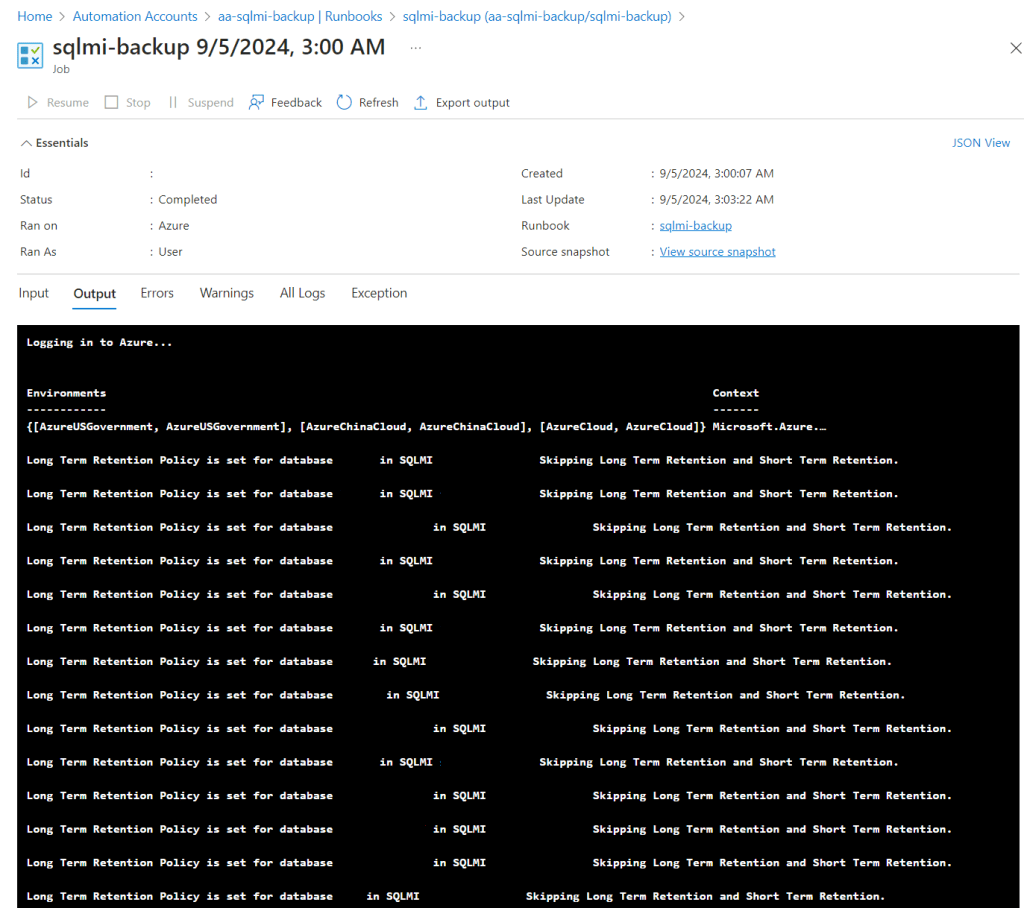
- It checks the Long Term Retention (LTR) policy for each database. If the LTR policy is already set (in this case, 12 months), it skips that database.
- If the LTR policy is not set, the script applies both the short-term (e.g., 30 days) and long-term (e.g., 12 months) retention policies to the database, ensuring proper backup configurations.
This ensures that every database in the Managed Instance has consistent backup policies applied.
This is the desired end result!
 cloudfriendly